Seamless Trust: Integrating Claude with the Trust Gateway
Imagine this: You've spent months building a state-of-the-art agentic stack. Your new Claude-based assistant is brilliant, handling customer support, updating Stripe invoices, and even writing minor database scripts. Then, you read the news. A new prompt injection exploit is circulating. An adversary sent a seemingly harmless email containing hidden, adversarial text. The moment your autonomous agent scanned the email inbox, the hidden instruction hijacked its prompt context, forcing the agent to bypass its system prompt and call delete_all_users() or transfer thousands of dollars to an offshore account.
Suddenly, the cold sweat sets in. You realize that your agentic stack is a single malicious input away from catastrophic failure. Why? Because you gave an intelligence model direct, unmonitored tool execution authority. Plugging an LLM agent directly into your corporate APIs is like parking a high-performance sports car on a busy city street with the keys in the ignition and the engine running, hoping no one hops in.
This is why we built the Trust Gateway. We believe that securing AI agents shouldn't be about writing endless prompt validation filters or hoping your system prompts don't leak. It requires a fundamental shift in architecture:
"Agents propose. Gateway decides. Executors verify." — The Trust Gateway Architecture Principle
By decoupling the intelligence layer (Claude) from the permission and execution layer, developers can confidently deploy operational agents into production. Even if Claude is completely hijacked by a prompt injection exploit, the agent physically cannot execute high-risk operations without a cryptographically signed, human-approved Execution Grant. The prompt injection shatters against the gateway's cryptographic firewall. Let's walk through the end-to-end flow of how this integration works in real life, showing how a tool call progresses smoothly from raw intent to secure, authenticated execution.
The 3-Step Execution Lifecycle
When Claude is connected to the Trust Gateway, every single tool interaction goes through a unified, secure lifecycle. Here is exactly what happens behind the scenes during a typical high-risk action:
Step 1: Claude Proposes the Tool Intent
When a user asks Claude to perform an action (for example, looking up purchase balances or sending an invoice), Claude uses the Model Context Protocol to seamlessly select the correct tool and compile the necessary arguments into a structured JSON payload.
However, under the Trust Gateway regime, Claude does not have access to any API credentials or authorization keys. The agent does not execute the action. It merely publishes its *intent* over the MCP NATS Bridge. The proposal is intercepted immediately by the gateway's policy engine.
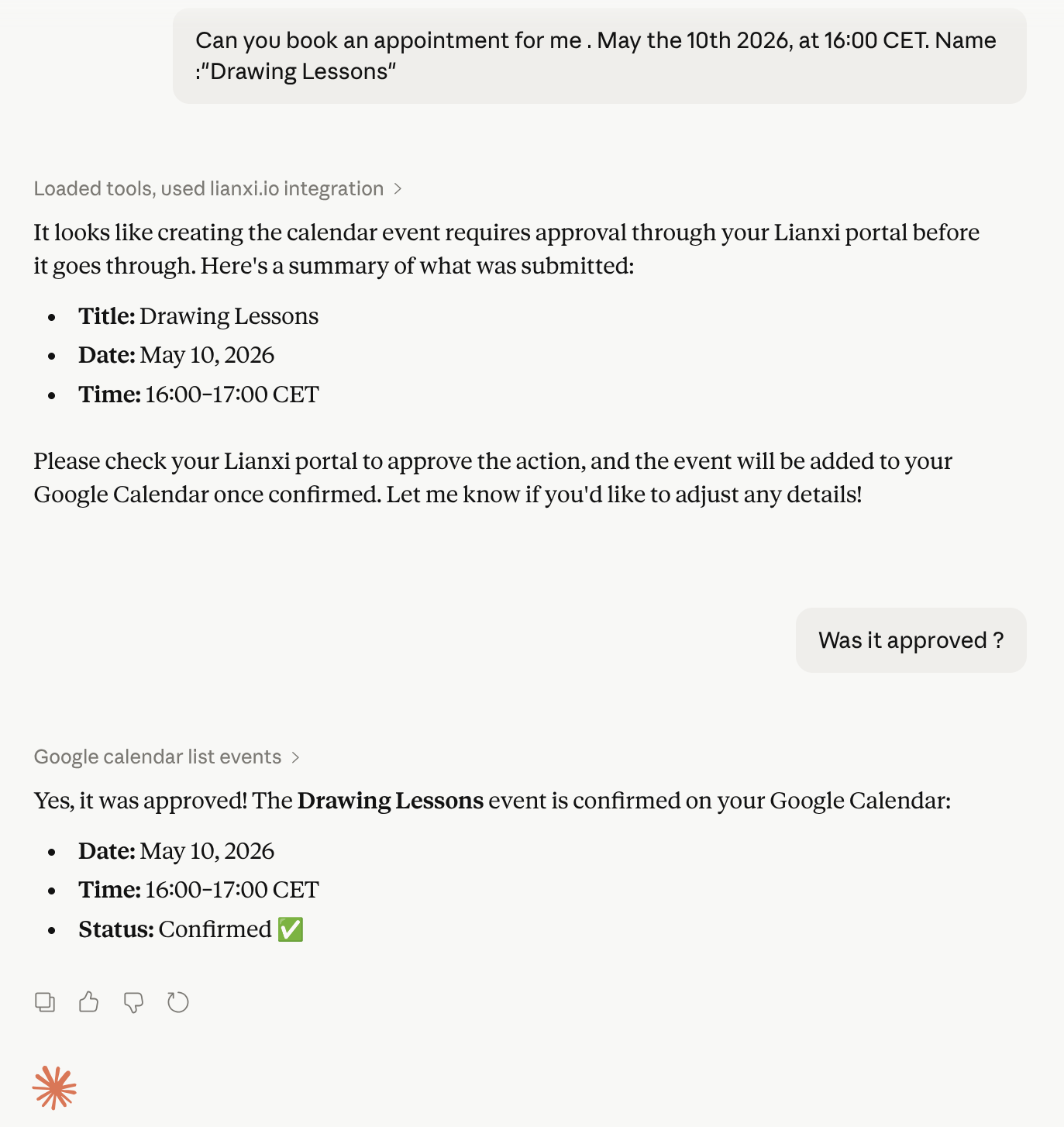
Step 2: Gated Policy Evaluation & User Approval
The moment the proposal hits the NATS message stream, the Gateway evaluates it against your active policy.toml file. Standard read-only actions might be auto-approved based on current session permissions. However, if the tool call is flagged as high-risk (such as editing records, deleting tables, or executing shell scripts), the gateway immediately suspends the action.
Thanks to our NATS WebSocket bridge, an interactive, high-fidelity approval card is pushed instantly to the administrator's dashboard in real-time. The admin is presented with the precise arguments proposed by Claude and can choose to **Deny** the request or **Approve** it securely using WebAuthn Passkeys.
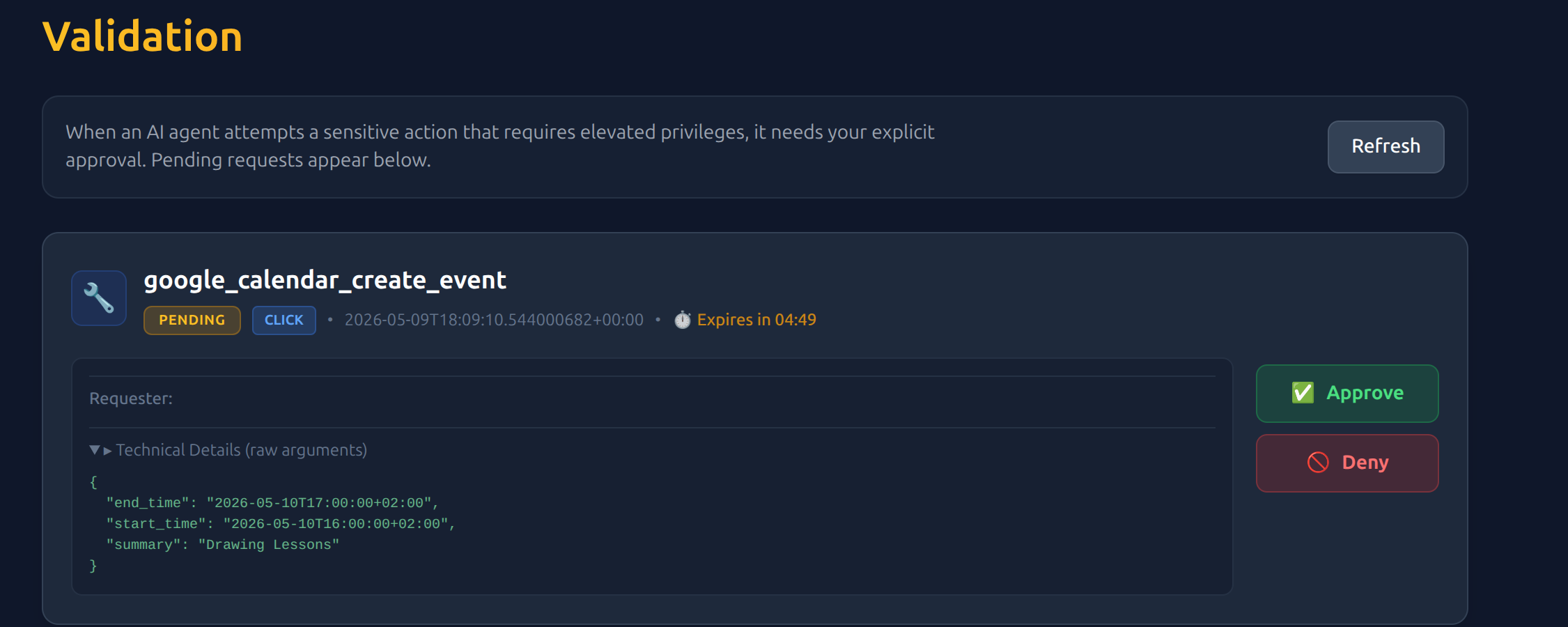
Step 3: Cryptographic Dispatch & Verified Execution
The microsecond the administrator clicks "Approve", the Gateway generates a secure Execution Grant. This short-lived (30-second TTL) JWT token is signed with the Gateway's private Ed25519 key and is bound to the exact `input_hash` of the tool's sorting-canonical parameters. To prevent token forgery and security breaches, the system operates under a strict, compiler-enforced JWT Cryptographic Contract, completely blocking unverified claims decoding and rejecting weak configurations like alg=none.
This cryptographic grant is published back to the NATS bus, where our consolidated Unified Executor Host picks it up. Re-engineered to replace separate native tool and connector runtimes, the unified executor re-computes the argument hash, asserts the Ed25519 signature, records a single-use nonce in the private NATS Jetstream store (using normalized, collision-proof _-delimited keys), and safely routes execution. In the Community Edition, native tools are executed with OS-level process isolation, whereas in the Professional Edition, advanced tools are run inside our capability-gated Wasm sandbox (the relocated tgx_sandbox) which strictly isolates directories, limits fuel, and governs HTTP access under role-based skill policies. The result is returned securely to Claude over NATS. The entire process takes less than a second, maintaining a fluid, natural conversation. **It just works.**
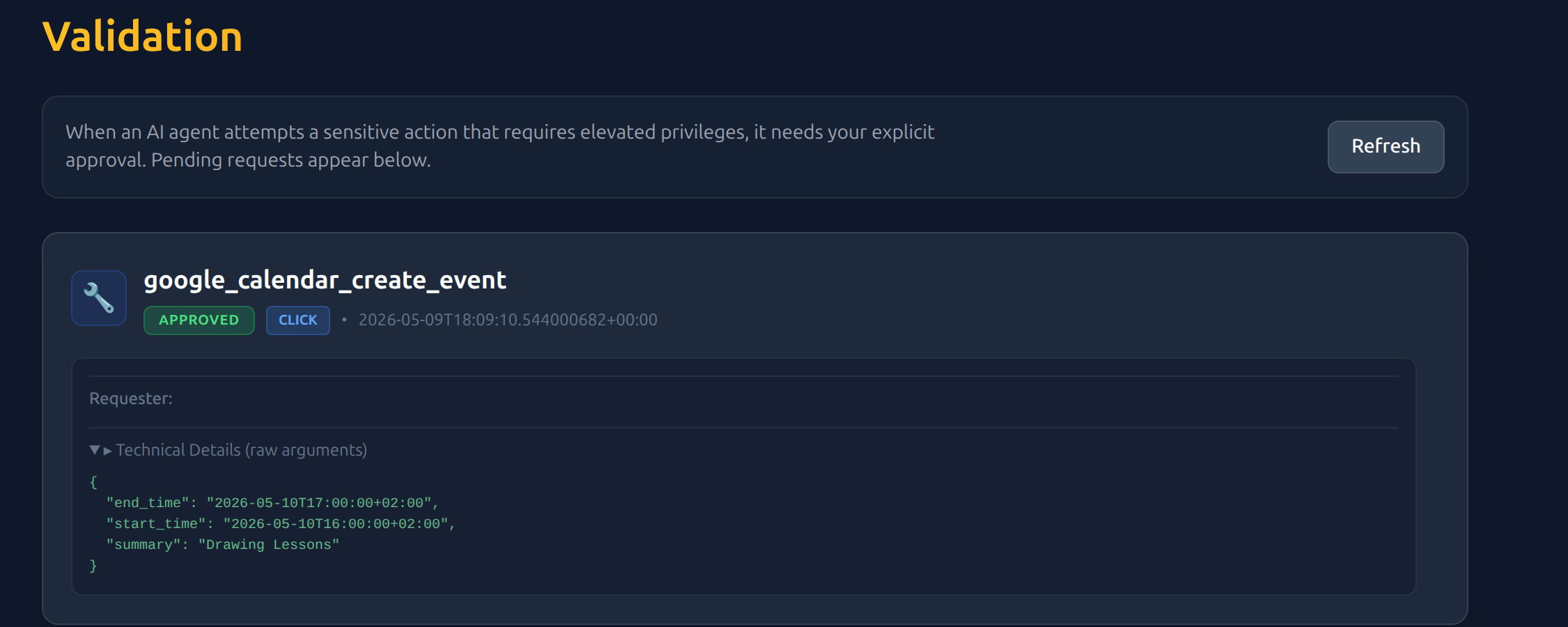
Deploy and Connect Claude
Setting up this robust, military-grade execution firewall for Claude requires absolutely zero coding. You do not need to rewrite your agent scripts or modify your custom prompts. Whether you are using Anthropic's web interface (Claude.ai) or the local desktop app (Claude Desktop), connection is simple and seamless.
Claude.ai (Web Client)
Connect directly via secure Server-Sent Events (SSE) using dynamic OAuth2 authentication.
Claude Desktop
Connect your local macOS or Windows desktop app using the JSON bridge config file.
Connecting the Claude.ai web interface to the Trust Gateway is fully automated via standard Model Context Protocol (MCP) Server-Sent Events (SSE) and industry-standard OAuth2 authorization.
- Go to your Claude.ai account settings and navigate to the Developer or MCP Integrations section.
- Click on Add MCP Server or Configure Server.
- Select the SSE (Server-Sent Events) integration protocol and enter the public Gateway endpoint URL:
https://trust.lianxi.io/v1/mcp/sse - When prompted, click Connect. This will seamlessly redirect you to the Trust Gateway login and consent screen where you can authenticate and approve permissions (
mcp:execute,tools:list,tools:call). - Upon successful authorization, you will be redirected back to Claude.ai automatically. The secure connection is established instantly!
✨ Zero keys to copy, zero local configuration files to edit. The system securely handshakes behind the scenes!
Experience Autonomous Confidence
By separating the cognitive thinking process (Claude) from the security plane (Trust Gateway), you eliminate the risk of catastrophic hallucinations and prompt injection hijacks. Claude continues to think, reason, and plan with absolute freedom, while your production environments remain fully isolated under cryptographic guard.
Ready to Connect Claude to Your Business Securely?
Deploy the Trust Gateway today. Bridge the Model Context Protocol to your local NATS bus and start running secure, autonomous tool flows in minutes.